
 12 min read





Key Takeaways
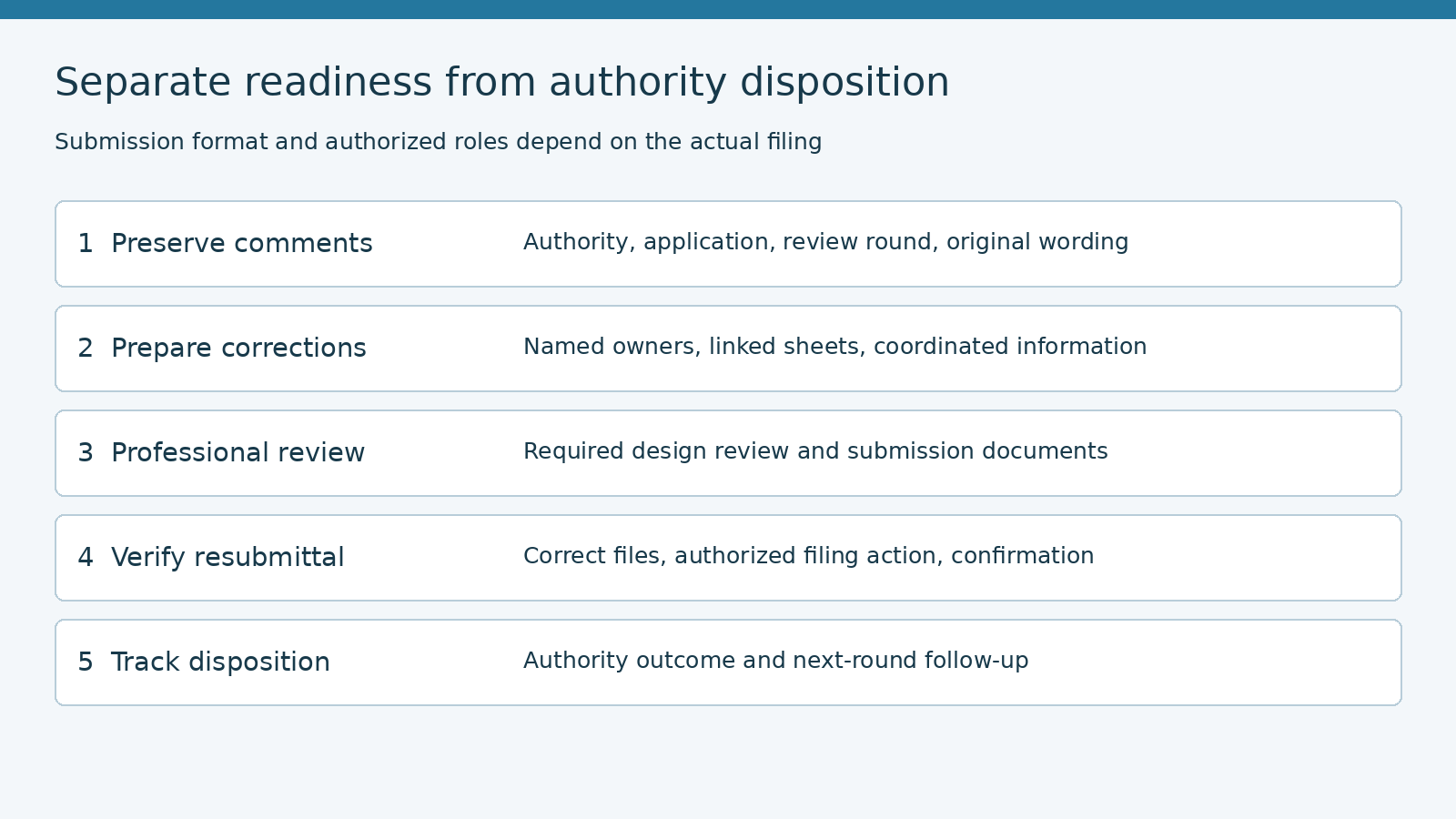
- Preserve every authority comment with its original number, source document, discipline, and review round.
- Assign the response to the responsible design professional and connect it to exact revised sheets or supporting documents.
- Track drawing edits, coordinated checks, professional review, and authority disposition as separate steps.
- Follow the current instructions for the specific filing system, including how responses and revised plans must be packaged.
- Verify the uploaded package and receipt before recording the resubmittal as complete.
The revised floor plan is ready, but the permit reviewer still cannot find the answer to a door-schedule comment. A structural response refers to an old sheet number, and the upload folder contains two files with the same name. The team has done much of the design work, yet the resubmittal is difficult to review.
A comment-response matrix helps you connect each request to its answer and supporting document. It also gives the project team a shared list of unfinished work. You can use a spreadsheet or an issue platform, provided the record keeps the authority's original comments, the responsible people, and the exact submission versions together.
The workflow below is for organizing a US construction permit response. Your authority's current instructions, applicable requirements, and responsible design professionals govern the actual corrections and filing. A clear response package supports review; it does not guarantee approval or authorize construction.
Confirm the filing and review round before editing
Record the project address, permit or application number, authority, permit type, and review round. Add the date the comments were issued and the source of each review document. A project can have related building, trade, planning, or other approvals, so make sure you are answering the comments for the correct filing.
Preserve the issued comments and the exact drawing set reviewed by the authority. Save marked plans, letters, portal notices, and required-item lists together. Keep them read-only in your working process so later edits cannot erase what the reviewer originally asked or which information the reviewer had available.
Read the current resubmittal instructions before splitting work among the team. Confirm whether the authority expects a response letter, replies embedded in marked plans, portal entries, replacement sheets, a complete revised set, or a combination. Your internal matrix can organize any of those formats, but it should not replace the required submission format.
Check whether all review groups have finished their round and whether partial responses are allowed. Portland's commercial permit correction notice describes an all-review-group response requirement for the commercial process discussed there. Treat that as a jurisdiction-specific example and confirm the current requirements for your own application.
Build one register without losing the original comments
Give every comment a stable internal reference while retaining the authority's original identifier. If different reviewers both use comment 1, include the discipline and round in your reference. An entry such as R2-ARCH-01 distinguishes it from a mechanical comment with the same number.
Copy the comment verbatim into the source field. Keep any internal interpretation in a different column. Shortening a comment can accidentally remove a second request, a drawing reference, or a condition that changes the response. When a comment includes several parts, create linked action rows while retaining its complete original text.
Include the source page or markup location. For comments placed directly on drawings, record the sheet and a useful location reference. Retain a link to the source file in your internal workspace, and check that everyone assigned to the response can open it. A screenshot can help explain a location, but should accompany the full source record.
| Register field | What it should identify |
|---|---|
| Comment reference | Authority number, discipline, and review round |
| Original request | Full comment and source document location |
| Responsible person | Design discipline owner and required contributors |
| Proposed response | Specific correction or documented explanation |
| Supporting location | Revised sheet, detail, schedule, calculation, or form |
| Review and disposition | Internal checks, submission version, and authority outcome |
Assign the response to the right discipline
Name one person accountable for preparing each response and identify the professional review it requires. A drafting coordinator can organize files and track actions, while the responsible architect or engineer must address design decisions within the applicable project and jurisdictional requirements. An assignment in a spreadsheet does not transfer professional responsibility.
Read the comment for related disciplines before assigning it. A request about an equipment room can involve architectural access, mechanical layout, electrical information, and supporting structural details. List those contributors on the same record so the owner can gather a coordinated answer instead of returning a partial correction.
The NYC Department of Buildings plan-examination guidance identifies the applicant-of-record role and the need for complete information and responses to objections. The role names and filing steps differ elsewhere. Confirm who may prepare, review, sign, seal, and submit each part of your actual package.
Set internal dates around the coordinated resubmittal, allowing time for professional review and file preparation. If an answer depends on a survey, product selection, owner decision, or outside consultant, record the dependency beside the assignment. Keep that item open until the required information arrives and the response has been reviewed.
Write responses that point to an actual change
A useful response tells the reviewer what was corrected and where to find it. Replace a vague note such as corrected with a specific description: door schedule updated on A-601, with the affected plan references coordinated on A-101. That is an illustrative document reference, not a proposed answer to a real code comment.
When the response is an explanation rather than a drawing change, identify the supporting document and have the responsible professional verify the explanation. Do not insert a code citation from memory or assume the project uses the same edition as a previous job. The professional response should use the actual applicable basis and address the reviewer's request directly.
If the comment is unclear or appears inconsistent with another requirement, preserve it and route a clarification through the authority's accepted process. Record the question, date, participants, and any written answer. Avoid silently reinterpreting an objection or representing an informal conversation as final acceptance.
Keep proposed responses distinguishable from submitted responses. Draft wording often changes as drawings are coordinated. Record the final text that accompanied the actual submission, along with the document version it references. Otherwise, the matrix can say one thing while the uploaded response contains another.
Coordinate the sheets affected by each correction
A correction on one sheet can affect information elsewhere in the set. Review related plans, sections, details, schedules, and calculations before marking the drawing work complete. A changed door identifier, for example, needs matching references wherever that door appears. The comment owner should identify the actual dependencies.
Use a small impact list beside the response. Record the documents checked and the person who checked them. If a change affects another discipline, request confirmation from that discipline before closing the internal coordination step. A revised architectural plan and an unchanged engineering background can create conflicting information in the same package.
Keep changes unrelated to authority comments visible as well. Owner-directed changes, coordination revisions, and other edits may need separate identification or review under the filing requirements. Do not hide them among comment corrections or assume they can be added without affecting the application's scope.
When revised documents affect the estimate, use a separate drawing-revision quantity log to record the quantity effect. The permit-response matrix records review requests and their answers. Linking the two records helps the team trace a change without mixing authority disposition with pricing or purchasing approval.
Work through a fictional three-comment example
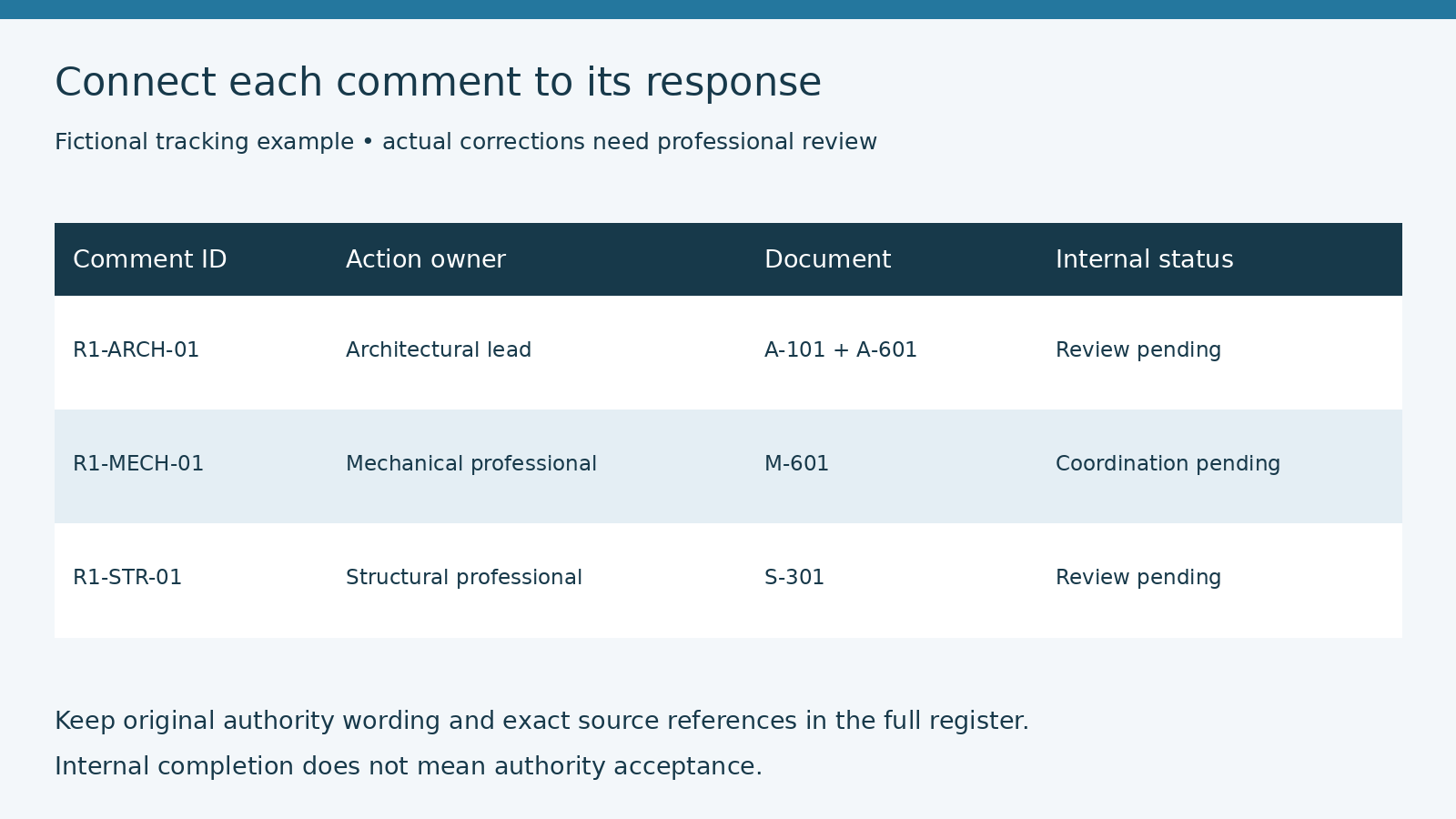
Suppose a small commercial project receives three requests: reconcile a door reference, provide a missing mechanical schedule reference, and clarify a structural detail location. These are fictional administrative descriptions. They do not establish which technical corrections would satisfy any actual authority.
For the door item, the architectural owner checks the plan and schedule together, revises the inconsistent reference, and identifies both locations in the response. The mechanical owner reviews the missing schedule information and returns the required document reference. The structural professional determines the appropriate detail response and checks any affected sheet callouts.
| Fictional ID | Action owner | Response evidence | Internal condition |
|---|---|---|---|
| R1-ARCH-01 | Architectural lead | A-101 and A-601 coordinated | Ready for professional review |
| R1-MECH-01 | Mechanical professional | M-601 reference confirmed | Awaiting coordinated check |
| R1-STR-01 | Structural professional | S-301 detail response prepared | Supporting review pending |
None of these internal conditions means the authority has accepted the response. After submission, retain the submitted version and update the authority-disposition field only from the actual review outcome. If one item returns in a later round, link the new comment to its predecessor and preserve the earlier response.
Check revisions and file versions before assembling the package
Confirm sheet numbers, titles, revision identifiers, and issue dates against the drawing register. Make sure the response references match the final exported sheets. A reference that was correct in the authoring file can become wrong after a sheet is renamed or a detail moves during coordination.
Follow the authority's current rules for clouds, revision marks, sheet replacement, and signatures or seals. Those conventions are not identical across jurisdictions or filing systems. Check whether the required deliverables include both an annotated response set and a clean plan set, and identify each file clearly in the package register.
Open the exported files before upload. Review page order, orientation, scale information, legibility, and whether all expected pages are present. Check that annotations and required signatures remain visible in the final format. Do not assume a successful export preserved every layer, reference, or embedded mark from the working files.
Use the agreed naming convention and keep superseded working files outside the submission folder. The folder should contain only the intended deliverables, with a register that identifies each filename, revision, purpose, and review status. Preserve the older versions in the project archive so the review trail remains available.
Verify the required filing steps, not just the upload
Uploading revised drawings may be one step in a larger resubmittal process. The filing can also require responses entered in a portal, completed statements, supporting forms, or an authorized submission action. Follow the instructions for the specific application and confirm the role that must complete each action.
For example, the DOB NOW Build FAQs describe objection-response and resubmission steps for that system. This illustrates why saving a document should not be treated as proof that a filing was resubmitted. Verify the current requirements in the actual system rather than copying steps from another authority.
Before submission, compare the package against the complete comment register. Every comment needs an intentional response or a documented unresolved action handled through the accepted process. Do not label unanswered items complete simply to make the spreadsheet appear ready.
After the authorized filer submits, save the receipt, confirmation, submitted filenames, and submission time. Where the portal permits, inspect the uploaded files and status to confirm that the intended versions are attached to the correct application. If the upload or submission result is uncertain, reconcile the existing filing before sending a second package.
Track the next review without overwriting the previous round
Keep the submitted response set fixed while the authority reviews it. Record later questions and additional information requests as dated updates. If a replacement document is required, identify which submitted version it supersedes and follow the authority's process for providing it.
When the next round arrives, compare it with the prior register. Record which comments were accepted, remain open, were revised, or are new, using the authority's actual terminology. Link repeated items across rounds so the responsible professional can see the earlier answer and understand what the reviewer still needs.
A plan-review approval and a permit issuance can involve different remaining requirements. Track the actual application status and required items instead of treating a favorable comment response as permission to begin work. Confirm the applicable authorization before construction proceeds.
Share the disposition with the project team and identify any resulting drawing or scope updates. For tenant work, keep this record connected to the project's core-and-shell and tenant-improvement scope review where relevant. The responsibility for paying for a change still follows the actual agreements.
Conclusion
A clear resubmittal connects each original comment to a reviewed response and an exact document location. Preserve the review round, assign the right professionals, coordinate related sheets, and verify the submitted package. Keep the authority's disposition separate from your team's internal completion status.
If you need drafting support for a revised package, share the current plans, complete comments, application requirements, and professional-review responsibilities with BidAccurate's permit drawing team. Agree on the response tracking and deliverables before revisions begin.
Frequently Asked Questions
What is a permit comment-response matrix?
It is a tracking record connecting each authority comment to its owner, response, revised document location, review status, and submission history. Use it alongside the authority's required response format.
Should I copy comments exactly?
Yes. Preserve the original wording and source reference, then put your interpretation or action notes in separate fields. Linked action rows can help manage comments containing several requests.
Who should approve the proposed response?
The responsible design professionals and other authorized participants should review their assigned work under the actual project and jurisdictional requirements. A coordinator's completion mark does not replace that review.
Can I resubmit only the sheets that changed?
Check the current instructions for your permit type and filing system. Some processes require replacement sheets, others a complete revised set or additional response files. Do not assume another project's format applies.
Does uploaded mean resubmitted?
Not necessarily. Saving or uploading files can precede an authorized resubmission action and other required steps. Retain the actual confirmation and verify that the correct documents belong to the intended filing.
How should I handle a comment that returns?
Keep the previous response and link the new review-round entry to it. Record the authority's latest request, assign the follow-up, and identify the additional information or revision needed for the next response.