
 12 min read





Key Takeaways
- Confirm model revisions, coordinates, selection sets, and test settings before reviewing individual clashes.
- Group related results around a decision while retaining the original clash IDs and affected elements.
- Give every coordination issue a location, useful viewpoint, accountable owner, and specific next action.
- Keep software status separate from design approval, field authorization, and contractual responsibility.
- Recheck revised models and nearby interfaces before closing an issue.
You open a clash report before the coordination meeting and find hundreds of results. Several screenshots show the same duct crossing the same beam. Other entries have no floor reference, and an issue marked resolved still appears in the model you received this morning. Starting at the top of that list can use the whole meeting without producing a clear decision.
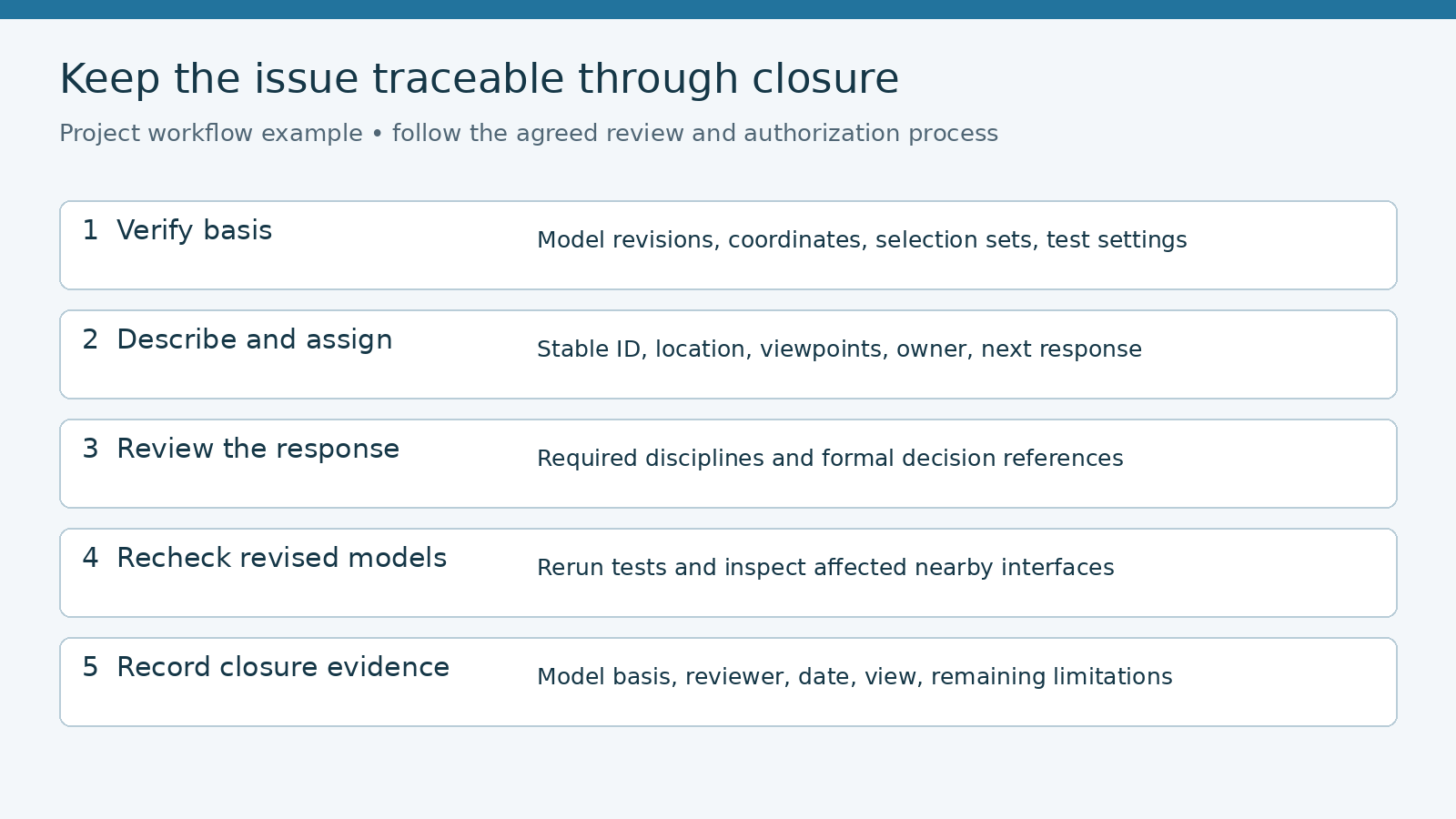
Your preparation should leave the team with a manageable issue register. Each entry needs enough information for the right person to investigate, propose a response, and show what changed. You can build that register with a spreadsheet and saved views or a shared coordination platform. The review logic stays the same: establish the model basis, understand the conflict, assign the next action, and preserve the evidence used to close it.
Confirm what the report actually tested
Start with the report header and model register. Record the coordination package date, model file names, discipline revisions, export dates, and test run time. A newly generated PDF can contain results from older models. Ask whether the clash test was rerun after the latest files were loaded, especially when the report and model viewer disagree.
Check that the models use the agreed coordinates, units, levels, and reference position. If an entire discipline appears displaced, investigate the federation setup before assigning dozens of individual conflicts. A project-wide positioning error needs a model correction and a fresh test. Treating every intersection as an installation issue would send several trades to solve the same setup problem independently.
Read the test definition as carefully as the results. Identify the two selection sets, the type of test, any tolerance, and the rules that exclude elements. A test limited to ductwork and structural beams cannot establish that the duct route clears sprinkler piping or access zones. Name the scope of the check in the register so nobody interprets a narrow test as a complete coordination review.
Ask the model authors what is represented. Insulation, hangers, equipment service spaces, and connection components may be absent or simplified. An apparently clear route can still need further review when those parts are added. Document the missing information and assign a follow-up check instead of recording an unsupported clearance conclusion.
Separate software results from project decisions
Clash detection reports geometric relationships under the settings you chose. The project team must decide what those relationships mean for the work. Some results identify a physical conflict. Others reflect an intentional relationship, a duplicate object, or a modeling convention that the agreed rules should address.
Autodesk's Navisworks Results tab guidance explains that statuses can change when a test is rerun and can also be changed manually. Review the history behind the label. A status alone does not document the decision, authority, or supporting information your project requires.
Agree on a short project status definition before reviewing the list. For example, an issue awaiting a proposed route needs a different next action from one awaiting verification of an uploaded model. Use your project's existing workflow where available. If software labels are fixed, explain their project meaning in the coordination procedure and keep comments specific.
| Review condition | Useful next action | Evidence to retain |
|---|---|---|
| Model basis unclear | Confirm revisions and rerun the test | File register and test settings |
| Physical interference confirmed | Assign investigation and proposed response | Element IDs and located viewpoint |
| Change uploaded | Verify the revised arrangement | New model revision and comparison view |
| Result intentionally accepted | Record the authorized rationale | Decision reference and responsible reviewer |
Locate each issue so another person can find it
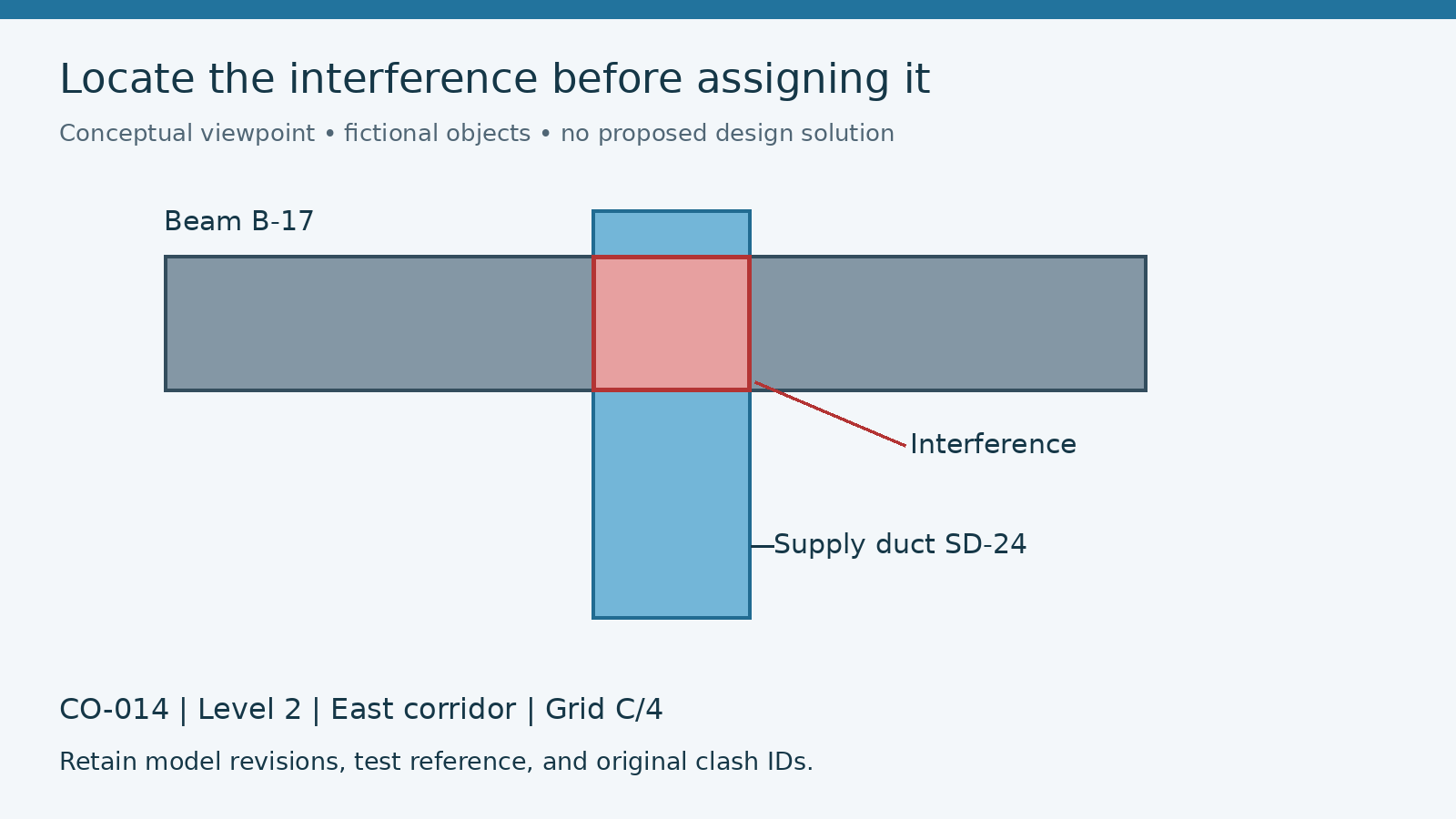
A screenshot of red and green objects needs context. Add the building or zone, level, grid reference, and a room or equipment identifier when available. Include the model names and element identifiers used by the coordination tools. These references help a trade locate the same objects in its authoring model without guessing from a cropped image.
Save one view that explains the immediate interference and another that shows the surrounding route when the decision depends on adjacent work. Keep enough structure visible to establish orientation. Use clipping and transparency carefully; hiding a nearby system can make a proposed response look simpler than it is.
Write the issue description as an observable condition. For a fictional example: “Supply duct SD-24 intersects beam B-17 at Level 2, grid C/4. Mechanical and structural teams to review the interface and identify an acceptable coordinated response.” That gives the team a location and a task without instructing someone to cut structure or move a system without the required review.
Group repeated results around one clear decision
A single routing problem can produce several clash rows because the model contains separate fittings, insulation objects, or structural pieces. Review the objects and their location before grouping. The aim is to give the team one understandable decision while preserving every source result that belongs to it.
Keep the original clash IDs in a member list or an attached report. Give the group a stable issue ID and a descriptive title, such as “Level 2 east corridor supply route at grid C/4.” Record how many results it contains, but avoid treating a falling result count as proof that coordination is complete. Model changes and test filters can also change that count.
Separate nearby results when they need different owners or decisions. A duct crossing a beam and a blocked equipment access space may occur in the same room, yet the review questions differ. Combining them into one broad “mechanical conflicts” issue makes it harder to decide whether either condition has actually been addressed.
Autodesk's clash-management instructions cover assigning clashes or groups and adding notes. Use those functions to keep responsibility and context attached to the reviewed results. Preserve a record before changing grouping rules so you can explain why the issue register differs from the original report.
Set priorities using the work that depends on the answer
Review priority should reflect the consequence of leaving the issue open. Ask whether fabrication, an upcoming installation, a design decision, or access to a constrained area depends on the response. Record that dependency in ordinary language. “Needed before the Level 2 duct fabrication release” gives the team a useful reason to act.
Do not rank issues solely by the apparent size of an intersection. A small conflict near a fixed connection can require more coordination than a larger overlap in an unfinished model. Similarly, a visually clear installation may need an access review if the required service envelope was not included in the test.
Use agreed priority categories and explain exceptions. The person reviewing the report can identify the dependency and request attention, but should not invent a construction sequence or approve a design change. Bring the responsible design and construction participants into decisions that affect their scope.
Assign an owner and a response that can be checked
Give each issue one accountable person for the next response. That person may need input from several disciplines. List the required reviewers separately so assignment does not suggest that one subcontractor has authority to resolve every part of the interface.
A useful action says what information is needed. “Review clash” leaves the assignee to infer the deliverable. “Confirm whether the proposed duct route can be revised within the coordinated ceiling zone, identify affected connections, and return a marked viewpoint for team review” describes a response the meeting can evaluate.
Include a due date tied to the actual project decision. If the team cannot commit during preparation, mark the date for confirmation at the meeting. Keep the issue open until someone accepts the action. A name entered by the coordinator does not establish that the recipient received the assignment or agreed to the proposed deadline.
Where a question needs an RFI, design response, or formal change process, cross-reference that record. The coordination issue should show the relationship and current next action. A meeting note or a model comment should not silently replace the project's required contractual communication.
Build a small issue register with a complete audit trail
Use a stable issue ID throughout the review cycle. Retain the original description, then add dated comments for later findings. If the issue changes materially, explain the change instead of overwriting the first observation. This helps the next reviewer understand whether the team is checking the original conflict or a new condition.
| Field | Fictional issue example |
|---|---|
| ID and location | CO-014; Level 2 east corridor; grid C/4 |
| Source basis | Mechanical M04; structure S03; test T-02 |
| Affected objects | Supply duct SD-24 and beam B-17 |
| Next response | Mechanical lead to return coordinated proposal for review |
| Required input | Structural reviewer and ceiling coordination lead |
| Closure evidence | Revised model reference, rerun result, and documented review |
Attach viewpoints and relevant document references to the issue rather than scattering them across unrelated messages. If the team exchanges issues between applications, verify that the receiving system preserves the fields you rely on. buildingSMART's BCF API specification describes a model-based issue exchange structure. Actual application support and project setup still need checking before you depend on an exchange.
Prepare a meeting agenda that leads to decisions
Send the register with the model package reference and views before the meeting. Identify which issues need a decision and which only need a progress update. Participants should know where their input is needed and which source files to open. A list sorted only by software-generated number rarely provides that context.
For each decision item, state the unresolved question, the required participants, and the work waiting on the answer. Keep proposed responses visible alongside their assumptions. If a proposal relies on an unconfirmed ceiling height or equipment connection, make that uncertainty part of the discussion rather than hiding it in a comment.
Record the outcome while the issue is being discussed. Capture the agreed next action, owner, due date, and any required formal review. If no decision is reached, preserve the question and say what information is missing. Avoid changing the status to closed simply because the meeting moved to the next item.
Recheck the revised model before closing the issue
When a revised model arrives, confirm its revision and reload it into the agreed coordination package. Rerun the relevant test and examine the revised arrangement in context. Check that the original condition changed and that the response did not create another interference nearby.
Review affected interfaces beyond the two original objects where needed. A duct route adjustment can affect connections, hangers, insulation space, ceiling coordination, and access. The responsible participants should determine the required checks from the project documents and model scope. Keep outstanding checks visible if the model does not contain enough information to verify them.
Compare the software result with the issue history. A clash can disappear because an object was removed, a model was omitted, or a selection set changed. Confirm that the expected elements remain in the test. Record the rerun date, model basis, reviewer, and supporting view before applying the project's closure status.
Carry approved quantity or scope changes into the appropriate estimating records. The workflow in tracking quantities between drawing revisions can help you preserve that separate change trail. Coordination closure does not itself establish a price adjustment or authorize a purchase.
Conclusion
A useful clash-report review produces issues that another person can locate, understand, and act on. Verify the source models first, retain the original result references, and assign a specific response. Close each issue against revised information and the agreed project review process.
If you need help organizing coordinated model information for preconstruction, discuss the source files and expected deliverables with BidAccurate's BIM services team. Define the model scope, issue register, review responsibilities, and handover format before work begins. For related trade scope checks, use the mechanical takeoff review checklist alongside the coordination process.
Frequently Asked Questions
What should I check first in a BIM clash report?
Confirm the model files, revisions, coordinates, and test run time. Then review the selection sets, rules, and tolerances so you understand what the report checked and what remains outside its scope.
Should every clash become a separate issue?
No. Related results can share an issue when they require the same decision and response. Preserve their original IDs, and separate conditions that need different owners, reviews, or closure evidence.
Does a resolved status mean the design is approved?
No. Software status describes the result within that tool's workflow. Design approval, construction authorization, and contractual responsibility follow the actual project requirements and must have their own supporting records.
Who owns a clash between two trades?
Assign one person to coordinate the next response and identify everyone whose input is required. The project team must agree on responsibility; the assignment alone does not transfer design duties or contractual obligations.
What makes a useful clash screenshot?
Show the affected objects with enough nearby context to establish orientation. Add the level, grid or room reference, element IDs, model revisions, and a clear description of the condition. Include a wider route view when needed.
How do I verify that an issue can be closed?
Confirm the revised model basis, rerun the relevant test, inspect the original location and affected interfaces, and retain the required review evidence. Check that the result did not disappear because an object or model was excluded.